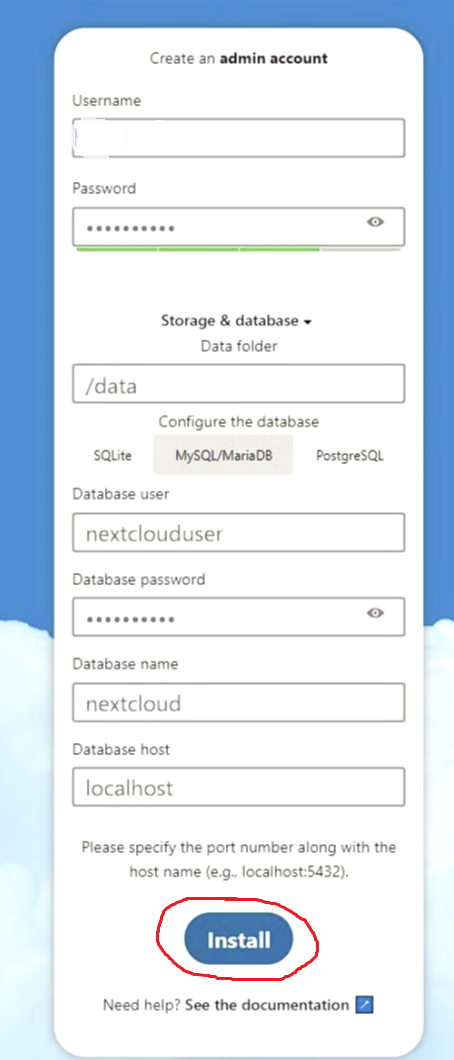
I try to run your nextcloud container in combination with mariadb, which is running as a normal installation on the host.
Host: OpenSuse Leap 15.6
I use the following input data into web installer GUI of nextcloud:
username: "admin" (example, I use a different name)
database user: "mariadb-nc", database: "nc_db"
database host: "static-host-ip:3306"
Access from container to mariaDB has been provided via removing bind-address statement from mariadb config file.
When trying to install nextcloud, I get the following error:
SQLSTATE[HY000] [1044] Access denied for user 'admin'@'%' to database 'nc_db'
When I click install multiple times, the user name in the error message gets numbered, like "admin1@%", "admin2@%" and so on. Users with these names are in fact created as mariadb users on the host machine, and seemingly the number is added to avoid a name collision.
I don’t know, if that could be relevant here, but I use a bind mount, so that nextcloud data will stored inside of the host filesystem, but obviously don’t get far enough to see anything there.
You need to provide your docker run or docker compose (we do not support deploying containers using any UI other than unraid)
then you need to provide full container logs for both containers beginning with our ascii logo.
then you need to provide the output of uname -mr && docker version
we don’t know what “click install multiple times” means
Please note, only nextcloud is running in a container. MariaDB is provided by the linux distro (openSuse Leap 15.6) as a normal host install.
───────────────────────────────────────

      ██╗     ███████╗██╗ ██████╗
      ██║     ██╔════╝██║██╔═══██╗
      ██║     ███████╗██║██║   ██║
      ██║     ╚════██║██║██║   ██║
      ███████╗███████║██║╚██████╔╝
      ╚══════╝╚══════╝╚═╝ ╚═════╝

   Brought to you by linuxserver.io
───────────────────────────────────────

To support LSIO projects visit:
https://www.linuxserver.io/donate/

───────────────────────────────────────
GID/UID
───────────────────────────────────────

User UID:    1000
User GID:    1000
───────────────────────────────────────
Linuxserver.io version: 31.0.7-ls387
Build-date: 2025-07-29T11:54:33+00:00
───────────────────────────────────────

using keys found in /config/keys
After completing the web-based installer, restart the Nextcloud container to apply default memory caching and transactional file locking configurations.
Alternatively, you can apply your own configurations by editing /config/www/nextcloud/config/config.php following the documentation:
https://docs.nextcloud.com/server/latest/admin_manual/configuration_server/caching_configuration.html
https://docs.nextcloud.com/server/latest/admin_manual/configuration_files/files_locking_transactional.html
[custom-init] No custom files found, skipping...
[ls.io-init] done.
PHP Warning:  Version warning: Imagick was compiled against ImageMagick version 1809 but version 1810 is loaded. Imagick will run but may behave surprisingly in Unknown on line 0
Exception: Not installed in /app/www/public/lib/base.php:228
Stack trace:
#0 /app/www/public/lib/base.php(691): OC::checkInstalled()
#1 /app/www/public/lib/base.php(1171): OC::init()
#2 /app/www/public/cron.php(24): require_once('...')
#3 {main}
PHP Warning:  Version warning: Imagick was compiled against ImageMagick version 1809 but version 1810 is loaded. Imagick will run but may behave surprisingly in Unknown on line 0
Exception: Not installed in /app/www/public/lib/base.php:228
Stack trace:
#0 /app/www/public/lib/base.php(691): OC::checkInstalled()
#1 /app/www/public/lib/base.php(1171): OC::init()
#2 /app/www/public/cron.php(24): require_once('...')
#3 {main}
Remark: the PHP warning on Imagick is logged multiple times, I removed those as they are identical.
uname -mr && docker version
6.4.0-150600.23.60-default x86_64
Client:
 Version:           24.0.9-ce
 API version:       1.43
 Go version:        go1.22.12
 Git commit:        fca702de7f71
 Built:             Wed Jun  4 12:00:00 2025
 OS/Arch:           linux/amd64
 Context:           default

Server:
 Engine:
  Version:          24.0.9-ce
  API version:      1.43 (minimum version 1.12)
  Go version:       go1.22.12
  Git commit:       fca702de7f71
  Built:            Wed Jun  4 12:00:00 2025
  OS/Arch:          linux/amd64
  Experimental:     false
 containerd:
  Version:          v1.7.27
  GitCommit:        05044ec0a9a75232cad458027ca83437aae3f4da
 runc:
  Version:          1.2.6
  GitCommit:        v1.2.6-0-ge89a29929c77
 docker-init:
  Version:          0.2.0_catatonit
  GitCommit:
“click multiple times” refers to clicking on the install button of Nextcloud Gui
your docker version is an unsupported and unmaintained version. I strongly encourage you to update.
in your screenshot, you show that you’ve typed localhost as where the mysql/mariadb database is, but nextcloud does not have one built in. you need to put the correct destination. If you are using our mariadb container and it shares a custom bridge with nextcloud, normally this would simply be mariadb but localhost will definitely not work.
On 1: Ok, then I may be stuck, since the distro to my knowledge does not provide a more current docker version.
On 2: Yes, this screenshot is only to show the Nextcloud installer GUI to answer the question.
I use [static-host-ip]:3306, not “localhost”. Otherwise - as you indicated - I get a related error.
you shouldn’t install from your distro anyway Install | Docker Docs while they dont have a direct install process listed for suse, you can use the binaries.
it’s not very helpful to us when you ask for support but show things that aren’t how you do it
as a note, putting the static host ip will make you nat to the host, then nat back to the database. You should be putting them in a shared custom bridge and simply typing mariadb, assuming mariadb is the container_name of the mariadb container. I missed that mariadb is not in a container
Are you trying to use a reverse proxy when doing this or are you browsing to https:// to do it?
@MrSwitch
I have the same setup
Find the networkid of the network you’re nextcloud is running in: docker network ls --format json | jq "select(.Name == \"nextcloud_default\")" | jq -r .ID
Then, find the gateway of that networkid: docker inspect ${NETWORKID} | jq -r .[].IPAM.Config[].Gateway
you don’t need to do any of this. literally put mariadb and nextcloud in the same compose project, or simply put them both on the same custom bridge, and just use the container_name which is mariadb by default. No need for extra_hosts or anything else. We follow the KISS principle
ah my bad, in that case the host should be the ip of the docker host; there is still no need for the steps you listed unless properly documented to avoid future confusion. bear in mind, most users here are inexperienced